
Introduction
Picture yourself sharing a live conversation with someone halfway around the world without leaving your living room—CamSurf turns that idea into a straightforward reality. Since opening in 2017, it has drawn millions of users who want immediate, camera-to-camera introductions.
Because similar sites are easy to find, it’s fair to ask what, if anything, distinguishes this one, whether every feature is free, and how much of your evening it deserves. The overview below walks through connection speed, safety tools, paid extras, and the small details that shape the experience. Let’s find out if CamSurf online is your next digital hangout spot.
Getting Started on CamSurf
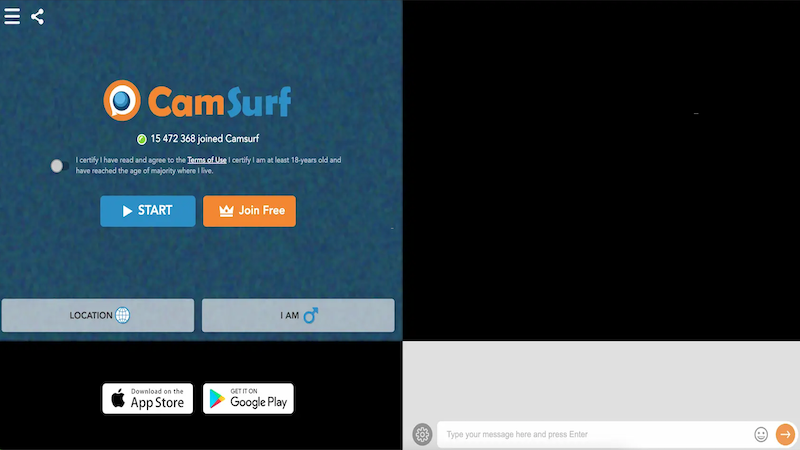
The moment you land on the CamSurf website or open the CamSurf app, one thing is clear: simplicity reigns supreme. The interface is clean and intuitive, centered around a prominent “Start” button. The platform prides itself on being a “lightweight chat platform,” designed for speed without sacrificing core features.
-
Zero to Chat in Seconds: True to its word, you can be in a video call almost instantly. There’s no lengthy sign-up process blocking your way. You simply agree to the terms, allow camera access, and hit “Start.” This low-barrier entry is a huge part of its appeal for spontaneous chatters.
-
The “Next” Button is Your Best Friend: Not feeling the vibe? A single click on “Next” immediately disconnects you and pairs you with a new stranger. This roulette-style navigation makes browsing through conversations effortless and fast.
Free Version vs. CamSurf Plus
Understanding CamSurf’s model is crucial. It operates on a freemium system, meaning a solid base experience is free, but enhanced features live behind a paywall.
Your Free Membership Includes:
-
🌍 Basic Random Chat: Unlimited access to connect with strangers worldwide.
-
😷 Face Filters & Virtual Masks: Fun tools to add a layer of privacy or playfulness.
-
🔤 Auto-Translate: A handy feature to help break down language barriers mid-chat.
-
💬 Text Chat Box: A small chat window within the video frame lets you type alongside talking.
Upgrading to CamSurf Plus Unlocks:
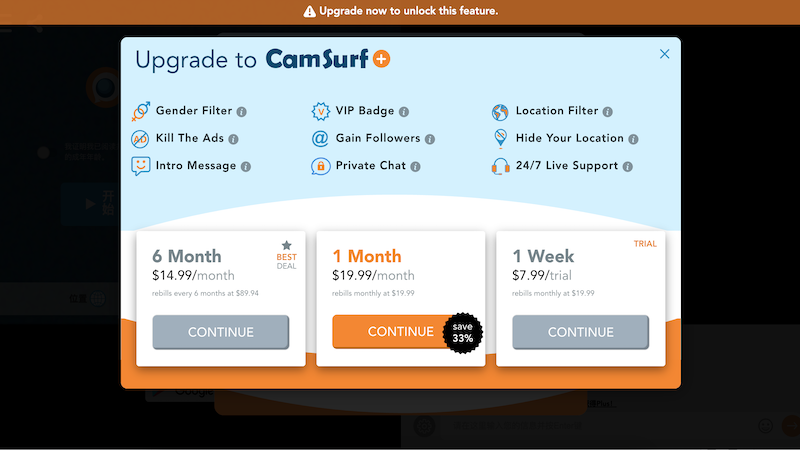
To access filters that narrow down your connections, you need CamSurf Plus. This paid tier, often promoted with “limited-time special pricing for new members,” includes:
-
🎯 Gender & Location Filters: Choose to connect with Male, Female, or Couple users in specific countries.
-
🚫 Kill the Ads: Enjoy an ad-free 1v1 chatting experience.
-
✉️ Intro Message & Private Chat: Send a message before connecting or chat privately.
-
✨ VIP Badge & Other Perks: Get a verified status, hide your location, and gain follower visibility.
Pricing is typically structured as a subscription: $7.99/week, $19.99/month, or a discounted semi-annual plan.
Standout Features & Community Vibe
Beyond the basics, CamSurf has cultivated features aimed at building a safer, more engaging environment.
-
Safety & Moderation First: The platform highlights its “community reporting system.” Users can report inappropriate behavior with one click, and accounts with multiple violations face bans. This active moderation helps create a more respectful space than some completely unmoderated alternatives.
-
More Than Just Chat: The “Stories” section provides insights and tips, helping new users learn the ropes. They also maintain clear Guidelines, FAQ, and even a Press section, showing a level of professional structure.
-
Designed for Mobile: The CamSurf app is “100% free to download and designed to use minimal storage space.” It offers the same great experience as the web platform, allowing you to meet new people on the go.
⚠️ Important Considerations & User Experiences
No platform is perfect, and being aware of potential downsides is key.
-
The Filter Paywall: The most significant limitation for free users is the lack of gender and location filters. If you have a specific preference, you’ll need to upgrade.
-
Account Deactivation Quirks: Some users report a cumbersome account deletion process. While the menu offers options to “deactivate” (temporary) or “delete my account permanently,” the confirmation email link can sometimes malfunction, looping users back to the main page without completing the action. This is a notable point for those conscious about their data.
-
The “Freemium” Reality: The constant nudge to upgrade to Plus can be noticeable. Features like filtering are central to the service’s appeal, yet they are locked, which may frustrate users seeking a completely free and fully-featured experience.
Who is CamSurf Best For?
CamSurf carves out a strong niche by balancing speed, safety, and simplicity.
-
You’ll Love CamSurf If… You want a no-fuss, fast way to meet random people globally. You appreciate having basic safety tools like reporting and optional face masks. You don’t mind seeing ads and are okay with completely random pairings without filters.
-
You Might Want a CamSurf Alternative If… Your primary goal is to filter connections by gender or location without paying. You prefer a platform with more built-in social features or games. You are highly sensitive to ads or have had persistent issues with account management.
Conclusion
CamSurf successfully delivers on its core promise: instant, random video chat with strangers in a relatively safe environment. Its strength lies in its incredible speed, straightforward design, and genuine effort to police its community. For a spontaneous, global chat fix, the free version is more than capable.
However, its true potential—the ability to meaningfully filter your experience—is reserved for CamSurf Plus subscribers. This paywall is the platform’s biggest trade-off.
Ultimately, if you’re curious about the world of random video chat, CamSurf is a fantastic and safer starting point. Give the free version a spin with an open mind. When you want a say in who appears on-screen, weigh CamSurf’s Plus tools—or browse elsewhere—for filters that match your preferences.
Frequently Asked Questions
-
Is CamSurf free to use?
Yes, the core random video chat is free. You can meet strangers, use text chat, auto-translate, and face filters without paying. However, advanced features like Gender and Location Filters require a CamSurf Plus subscription.
-
Do I need to download the CamSurf app?
No, you can use CamSurf directly in your web browser. However, the mobile CamSurf app (free on Android and iOS) is optimized for on-the-go use and designed to take up minimal storage space.
-
How does CamSurf ensure safety?
CamSurf hands users a straightforward “report” button; when someone steps outside the guidelines, a moderator reviews the flagged session and, if the claim is upheld, removes the offending account. Features like virtual masks also help users protect their privacy.
-
What are the main CamSurf alternatives?
Several strong CamSurf alternatives offer different approaches to online connection. ChatMatch focuses on letting you browse and select from recommended user profiles. For completely random and anonymous chat, FunYo is a go-to, though it lacks filters. If you prefer secure and intentional calls, a service like 1v1 Video Call is designed for formal one-on-one conversations.
-
What is included in the CamSurf Plus subscription?
Plus unlocks Gender Filter, Location Filter, an ad-free experience, a VIP badge, intro messages, private chat, the ability to hide your location, and priority live support.